How to Turn Your Photo Into a Pixar-Style Emoji Sticker Pack Using AI Prompts (Boy & Girl Versions)
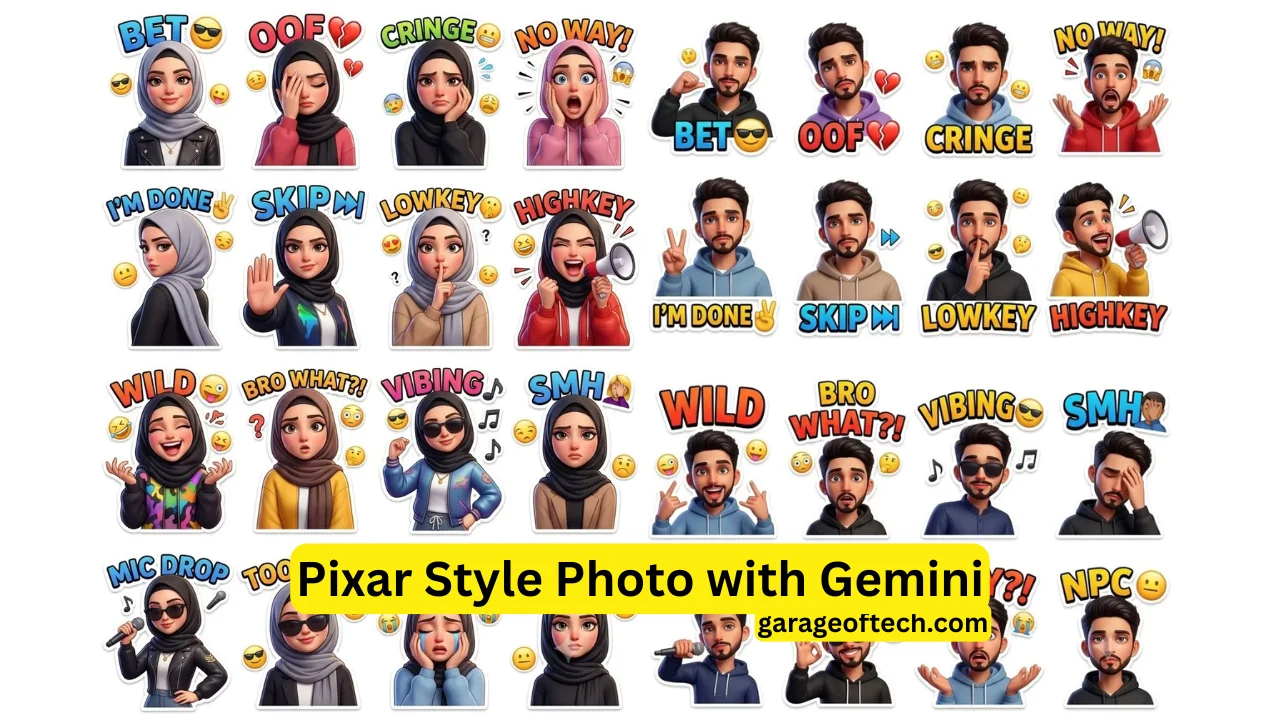
My cousin sent me a sticker on WhatsApp last month that stopped me mid-scroll. It was a little cartoon version of her — same face, same curly hair — but rendered in this glossy, cinematic Pixar style, with the caption “CRINGE” stamped underneath in chunky comic typography. I immediately texted back: “HOW.”
That one message kicked off a two-week rabbit hole of testing AI tools, tweaking prompts, and generating some genuinely impressive sticker packs. I’ve done this for myself, for friends, and honestly, it’s become one of the most fun things I’ve done with AI image generators. So I’m going to walk you through exactly how it works — including the two prompts that actually deliver results.
What Are Pixar-Style AI Emoji Sticker Packs, Really?
If you’ve spent any time on Instagram Reels or TikTok lately, you’ve probably seen them. Someone uploads a selfie, runs it through an AI tool, and out comes a 4×4 grid of cartoon stickers — each one showing a different reaction expression, all based on the person’s actual face. The style mimics the kind of shiny, expressive 3D animation you’d see in a Pixar or Disney film: smooth skin, exaggerated expressions, soft lighting, and those satisfying white outline borders that make stickers pop on any background.
What makes these different from basic cartoon filters is the identity preservation. The AI doesn’t just create a generic cartoon character — it actually tries to recreate your face with all its specific features, just in a stylized form. Your nose, your hair texture, your jawline — it’s all there, just rendered in that glossy animated-film quality.
Why These Two Prompts Work So Well
I’ve tested a lot of AI prompts for sticker generation. Most of them produce either something that looks nothing like the original person or something that looks like a generic cartoon character wearing a shirt the person might own. The prompts I’m sharing here are different because of how specific and layered they are.
Every detail in the prompt is doing a job. “Perfect facial identity preservation” tells the AI this is the most important thing — don’t sacrifice the face for the style. “Glossy cinematic cartoon rendering” pulls the output toward that Pixar-quality finish instead of a flat 2D look. Listing all 16 reaction labels (BET, OOF, CRINGE, NO WAY, I’M DONE, SKIP, LOWKEY, HIGHKEY, WILD, BRO WHAT?!, VIBING, SMH, MIC DROP, TOO EASY, WHY?!, NPC) forces the AI to create variety in expression rather than generating 16 slightly different versions of the same neutral face.
The “4×4 premium sticker grid” instruction organizes the output into a ready-to-use format. And ending with “no blur, no distortion, no watermark” filters out the most common quality problems before they happen.
Let’s get into the actual prompts.
The Boy Version Prompt
Here it is, ready to copy:
Prompt 1 — Boy Version:
PROMPT: Ultra-premium 3D cartoon emoji sticker sheet of the EXACT same 20-year-old boy from the uploaded reference image, perfect facial identity preservation, maintaining the exact fluffy black hairstyle, beard style, eyebrows, jawline, eye shape, lip structure, skin tone, facial proportions, and recognizable Gen-Z expression style with zero identity drift, recreated in a glossy Pixar-inspired cinematic sticker illustration style, vibrant social media meme reaction pack aesthetic, ultra-detailed digital art, clean white background, arranged in a professional 4×4 sticker grid layout with evenly spaced premium stickers. The same stylish young boy appears in all stickers with unique emotions, gestures, and reactions including confident pointing pose with “BET 😎”, emotional facepalm with “OOF 💔”, awkward uncomfortable reaction with “CRINGE 😬”, shocked screaming expression with “NO WAY! 😱”, walking away pose with “I’M DONE ✌️”, stop-hand gesture with “SKIP ⏭️”, whispering side pose with “LOWKEY 🤫”, loud energetic shout with “HIGHKEY 📢”, crazy laughing mood with “WILD 😜”, confused questioning pose with “BRO WHAT?! 😳”, relaxed music vibe with “VIBING 😎🎵”, disappointed forehead-touch expression with “SMH 🤦”, stylish microphone drop action with “MIC DROP 🎤”, smart confident smile with “TOO EASY 😎”, emotional crying scream with “WHY?! 😭”, and emotionless blank stare with “NPC 😐”. Every sticker must feature dynamic hand gestures, expressive eyes, comic-style colorful typography above the character, floating emojis, comic motion effects, trendy hoodie outfits with color variations, fashionable bracelets, glossy rendering, cinematic lighting, smooth ambient shadows, soft rim light, ultra-clean white sticker borders, polished luxury digital painting finish, ultra-sharp details, realistic hoodie fabric folds, rich HDR colors, premium animated-film rendering quality, social-media-ready composition, expressive body language, highly polished mobile sticker aesthetic, ultra-detailed hair strands, rich eye reflections, premium viral emoji pack design. No blur, no low quality, no anatomy errors, no duplicate expressions, no extra limbs, no distorted face, no messy background, no dull colors, no watermark. 8K cinematic cartoon masterpiece, flagship-quality 3D emoji sticker pack, ultra-premium digital illustration, luxury social media reaction sticker collection.
A few things I want to flag about this prompt specifically. It mentions “fluffy black hair, beard, hoodie” — these are descriptors meant to anchor the character’s identity. If the person in your photo has different features, you can (and should) change these. More on customization later. The “Gen-Z vibe” cue pushes the expressions toward modern internet culture energy rather than something more reserved. And “motion effects” subtly nudges the AI to add a little dynamic energy to each panel, like the character is mid-reaction rather than posing.
The Girl Version Prompt
Prompt 2 — Girl Version:
PROMPT: Ultra-premium 3D cartoon emoji sticker sheet of the EXACT same beautiful 20-year-old girl from the uploaded reference image, perfect facial identity preservation, maintaining the exact hairstyle, facial structure, eyes, eyebrows, lips, skin tone, nose shape, jawline, and recognizable feminine expression style with zero identity drift, recreated in a glossy Pixar-inspired cinematic sticker illustration style, vibrant cute social media reaction pack aesthetic, ultra-detailed digital art, clean white background, arranged in a professional 4×4 premium sticker grid layout with evenly spaced glossy stickers. The same stylish young girl appears in all stickers with unique emotional expressions, cute gestures, and internet-style reactions including confident smile with “BET 😎”, dramatic facepalm with “OOF 💔”, awkward embarrassed expression with “CRINGE 😬”, shocked screaming reaction with “NO WAY! 😱”, turning away pose with “I’M DONE ✌️”, stop-hand gesture with “SKIP ⏭️”, whispering cute pose with “LOWKEY 🤫”, loud excited shout with “HIGHKEY 📢”, chaotic laughing expression with “WILD 😜”, confused questioning pose with “BRO WHAT?! 😳”, relaxed dancing vibe with “VIBING 😎🎵”, disappointed forehead-touch expression with “SMH 🤦”, stylish mic-drop action with “MIC DROP 🎤”, smart playful smile with “TOO EASY 😎”, emotional crying pose with “WHY?! 😭”, and emotionless blank stare with “NPC 😐”. Every sticker must feature expressive eyes with glossy reflections, cinematic cartoon rendering, colorful comic typography above character, floating emojis, comic motion effects, trendy hoodie and casual outfit variations, modern bracelets/accessories, soft cinematic lighting, smooth shading, ambient glow, polished white outline sticker borders, ultra-clean composition, luxury animated-film quality, premium vibrant colors, ultra-detailed hair strands, realistic fabric folds, social-media-ready reaction pack style, rich HDR depth, highly polished mobile messaging sticker aesthetic, premium digital painting finish, youthful Gen-Z internet personality vibe, ultra-sharp rendering and expressive body language. No blur, no low quality, no anatomy mistakes, no duplicate expressions, no distorted face, no messy background, no extra limbs, no watermark. 8K cinematic cartoon masterpiece, flagship-quality 3D emoji sticker pack, ultra-premium digital illustration, luxury social media reaction sticker collection.
The girl version swaps “fluffy black hair, beard, hoodie” for “stylish hairstyle” — intentionally left open so the AI interprets from the uploaded photo rather than forcing a specific look. It also uses “expressive feminine Gen-Z vibe” and “premium animated-film quality” instead of just “cinematic masterpiece,” which I found produced slightly softer, more refined output in testing. Small word choices matter more than you’d expect with AI prompts.
Which AI Tools Actually Support This Workflow
This is where a lot of people get stuck. Not every AI image generator supports image-to-image (img2img) workflows — meaning you can’t just upload a photo everywhere and expect it to work. Here’s where you’ll actually get results:
Adobe Firefly is probably the most accessible starting point. It has a clean interface, supports reference image uploads, and produces consistent output. The free plan has generation limits, but it’s enough to test.
Midjourney (via Discord or the web app) supports image prompting with the –iw parameter to control how much weight the AI gives to your uploaded photo versus the text prompt. It currently produces some of the best Pixar-quality renders of any tool I’ve used.
Leonardo AI has a dedicated image-to-image mode and an Image Guidance feature that’s excellent for identity preservation. It also has a generous free tier, which makes it great for experimenting without spending money immediately.
Ideogram has been surprisingly good for this use case — it handles text inside images better than most tools, which matters when you want those reaction labels (BRO WHAT?!, NPC, VIBING) to actually render legibly.
Bing Image Creator (powered by DALL-E) works for basic tests but has weaker identity preservation compared to the others. Use it to get a feel for the output, but don’t rely on it for a final product you’re proud of.
Step-by-Step: How to Actually Do This
Step 1: Pick the right photo. This is probably the most underrated part of the whole process. You want a clear, well-lit front-facing photo with a neutral or simple background. Natural light works better than harsh flash. The face should be the main subject — not a group shot cropped down, not a far-away full-body photo. A chest-up portrait is ideal.
Step 2: Choose your platform. For beginners, start with Leonardo AI or Adobe Firefly. For best quality, use Midjourney.
Step 3: Upload the photo. In Leonardo AI, go to Image Generation, select “Image to Image” mode, and upload your photo. Set the Image Strength to around 0.6–0.75 — this tells the AI to use the photo as a strong reference without being completely locked to it.
Step 4: Paste the prompt. Copy either the boy or the girl prompt from above and paste it into the prompt field. Don’t modify it on your first attempt — get the baseline result first.
Step 5: Set image dimensions. A square format (1:1 ratio) works well for sticker grids. 1024×1024 or higher if the tool allows.
Step 6: Generate and evaluate. Look at the output critically. Is the face recognizable? Are the reaction labels readable? Are the expressions varied and expressive? If not, try adjusting the Image Strength slightly or regenerating.
Step 7: Download and use. Most platforms let you download the full-resolution image. You can then crop individual stickers from the grid or use the full pack as-is.
How People Are Actually Using These
The most obvious use case is WhatsApp and Telegram sticker packs. Both apps let you import custom images as sticker packs, so once you have your grid, you can cut each panel into individual PNGs and import them. There are free apps like “Personal Stickers” for WhatsApp that make this very easy.
Instagram Stories and Reels are another huge use case — people are using these as reaction overlays, profile highlights, or just posting the full grid as content because it performs really well engagement-wise.
I’ve seen people use these for personal branding — content creators who want a consistent cartoon identity across their platforms without commissioning a full custom illustration.
And honestly, gifts are an underrated use case. Printing a sticker sheet of someone’s Pixar-style cartoon self is genuinely one of the more original birthday or holiday gift ideas I’ve come across.
Mistakes I Made (So You Don’t Have To)
Using a bad source photo. My first few attempts produced blurry, distorted output, and I couldn’t figure out why. Turns out I was using a screenshot from a video — compressed, slightly blurry, weird lighting. Switched to an actual portrait photo, and the results improved massively.
Choosing the wrong tool. I tried running these prompts on a tool that doesn’t support image uploads at all and got confused when the output had nothing to do with the reference face. Make sure you’re specifically using an image-to-image workflow, not just a text-to-image one.
Over-editing the prompt. There’s a temptation to tweak the prompts a lot on the first run. Resist it. Generate at least 3–5 times with the original prompt before changing anything, because AI outputs have natural variation. What looks like a prompt problem might just be an unlucky generation.
Setting image strength too high. If you set it to 0.9 or 1.0, the AI basically just filters the photo and you lose the Pixar cartoon transformation. Keep it in the 0.55–0.75 range.
How to Customize the Prompts
Once you have a solid baseline result, here’s how to tweak intelligently:
To change the age, replace “20-year-old” with whatever fits — “16-year-old,” “35-year-old,” etc. This subtly shifts the facial structure and style.
To change the style, swap “Pixar-style” for “Disney animated style,” “anime style,” or “Studio Ghibli style” — each produces a meaningfully different aesthetic.
To change the reactions, replace any of the listed labels with your own. Keep the same number or fewer — adding too many can cause the grid to get crowded or the AI to drop some.
To describe different hair or clothing, edit the specific descriptors in the boy prompt. If someone has short hair and wears glasses, say so — it helps the identity preservation.
Final Thoughts
What I keep coming back to with these prompts is how much joy they produce. Not in a “wow, AI is so advanced” way — more in a “I just turned my best friend into a Pixar character and she loves it” way. There’s something genuinely delightful about seeing a recognizable face rendered with that glossy, expressive animated-film quality.
The prompts above took real iteration to arrive at. They’re not random words thrown together — every phrase is earning its place. Use them as your starting point, not just a copy-paste solution, and experiment once you understand what each part is doing.
The best sticker pack I’ve made so far is still sitting in my WhatsApp as my most-used sticker. The “NPC” one in particular — absolutely sends every conversation.