How to Turn Couple Photos Into Romantic Paris Streets Movie Scenes Using AI
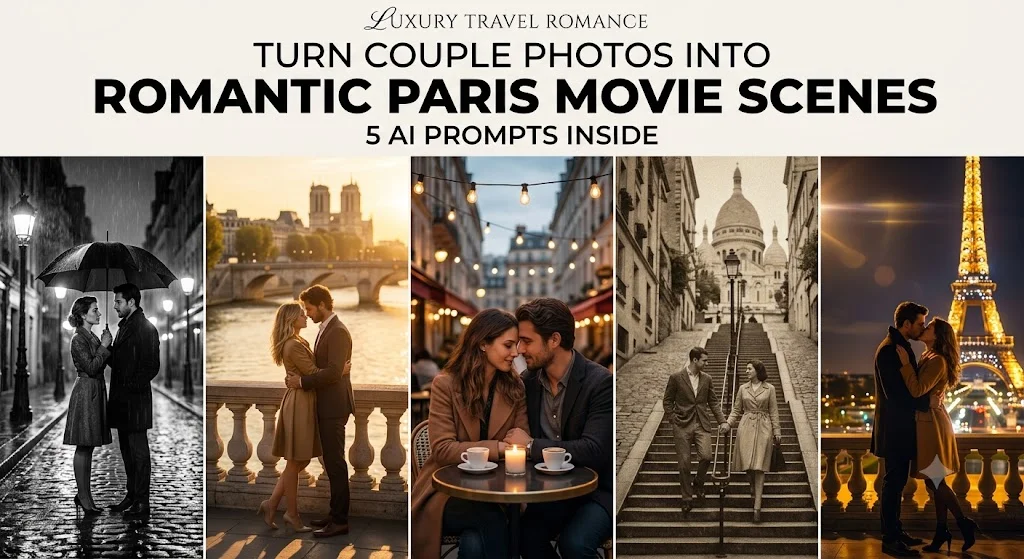
Last month, I nearly threw my phone across the room. My partner and I had just returned from a weekend trip, and I wanted to surprise them with a romantic, movie-style photo – the kind where we’re strolling a cobblestone Paris street, soft rain falling, everything bathed in that golden, nostalgic light you only see in French films. Problem was, we never actually went to Paris. Our best couple photo was taken in front of a beige wall at a friend’s barbecue. I figured AI could fix that in five minutes. I was wrong, but the journey that followed taught me exactly how to do it right, and now I can turn any ordinary couple photo into a scene that looks like it was pulled straight from a Parisian romance movie.
Introduction:
My name is Alex, and I test creative AI tools for a living – the kind that generate images, edit videos, and occasionally mess up so badly you laugh until you cry. I’ve tried everything from expensive desktop apps to shady mobile filters that promise the moon. The only tool that finally delivered that Parisian movie magic, while keeping our actual faces intact, was something I already had on my phone: Google Gemini. Not some obscure art platform, not a subscription you need to cancel before the trial ends. Just Gemini, the same AI assistant people use for emails and trip planning. But there’s a huge difference between knowing the tool exists and knowing how to speak its language. That’s what I want to share – the real, hands-on way to turn couple photos into romantic Paris streets movie scenes, the prompts that worked for me, and the embarrassing mistakes that almost made me give up.
THE ANNIVERSARY FAIL THAT STARTED IT ALL
My original plan was simple. Take our favorite selfie, upload it somewhere, and type “make us look like we’re walking through Paris at dusk, cinematic style.” Easy, right? Within an hour I had downloaded three different AI apps and got back a series of images that were equal parts hilarious and horrifying. One tool gave us flawless Paris backgrounds but replaced our faces with impossibly symmetrical models who looked nothing like us. Another tried to keep our faces but stretched my partner’s nose in ways that felt personal. A third simply refused to accept a photo of two people, insisting I crop myself out. I realized very quickly that preserving identity while also transforming the entire scene is the holy grail of AI image editing, and most tools just aren’t built for it yet.
WHY MOST AI TOOLS COULDN’T HANDLE OUR FACES
To understand why I landed on Gemini, you need to know what most image generators do wrong. Traditional diffusion models like Midjourney or Stable Diffusion are incredible at creating new faces, but they struggle to lock onto a specific real person’s features from a single uploaded photo. You get approximations that look like distant cousins. Specialized face-swap apps often do a better job with identity, but then the lighting, skin tone, and angle look pasted-on and fake. I needed a tool that could understand the whole image – not just the subject, but the relationship between the people, the mood, and the cinematic style – and then redraw the scene while genuinely keeping our faces intact. When I vented about this on a tech forum, someone casually said, “Have you tried just sending the photo to Gemini and describing what you want?” I hadn’t. It changed everything.
DISCOVERING GEMINI’S HIDDEN SUPERPOWER
Most people know Gemini for answering questions or summarizing documents. But with the latest image capabilities, you can upload a photo, give it a detailed text prompt, and it will generate a brand new image that edits the original based on your instructions. What blew me away was how naturally it handled identity retention when I was explicit about it. Instead of guessing who we were, it analyzed the uploaded photo, locked onto our facial structure, hair texture, body shape, and even our posture, then rebuilt the background and lighting around us. The results weren’t perfect on the first try – nothing ever is – but after tweaking my wording, I started getting images that genuinely looked like deleted scenes from a romantic French movie.
HOW TO USE GEMINI FOR STYLE TRANSFORMATION (STEP-BY-STEP)
If you’ve never tried this before, here is the dead simple process that finally worked for me.
First, open Gemini on your phone or desktop browser. You can use the Gemini app or visit gemini.google.com. Make sure you’re signed in and that you have access to the model that supports image generation. At the time I’m writing this, Gemini 2.0 Flash handles image editing beautifully, but the feature may already be rolled into the default experience as you read this.
Second, start a new chat. Tap the small image icon (it looks like a picture) and upload the couple photo you want to transform. Pick a high-resolution image where both faces are clearly visible and well-lit. Selfies at arm’s length work best. Avoid photos where one person is out of focus or half-hidden behind a coffee cup.
Third, in the text field, paste one of the prompts I’ll share in the next section. I can’t emphasize this enough: do not wing it. The exact phrasing matters. You need to explicitly tell Gemini to keep the original faces, expressions, and key details unchanged.
Fourth, hit send and wait. In about ten to twenty seconds, Gemini will return a generated image. You can then download it directly. If something looks slightly off – maybe the lighting on your face doesn’t match the scene – reply with a short correction like “keep our faces the same but make the skin tone match the warm sunset lighting.” Gemini remembers the context of the original photo, so you can iterate without starting over.
MY 5 GO-TO PROMPTS FOR PARISIAN MOVIE MAGIC
After days of trial and error, I developed a set of five prompts that consistently produce stunning results. Each one is a different romantic Parisian movie style, and all of them are written to keep you and your partner’s exact facial features, expressions, hair, and body shape fully intact. You can copy these word for word, just swap in your own names mentally if it helps, but don’t change the identity instructions.
Prompt 1: The Rainy Night Noir
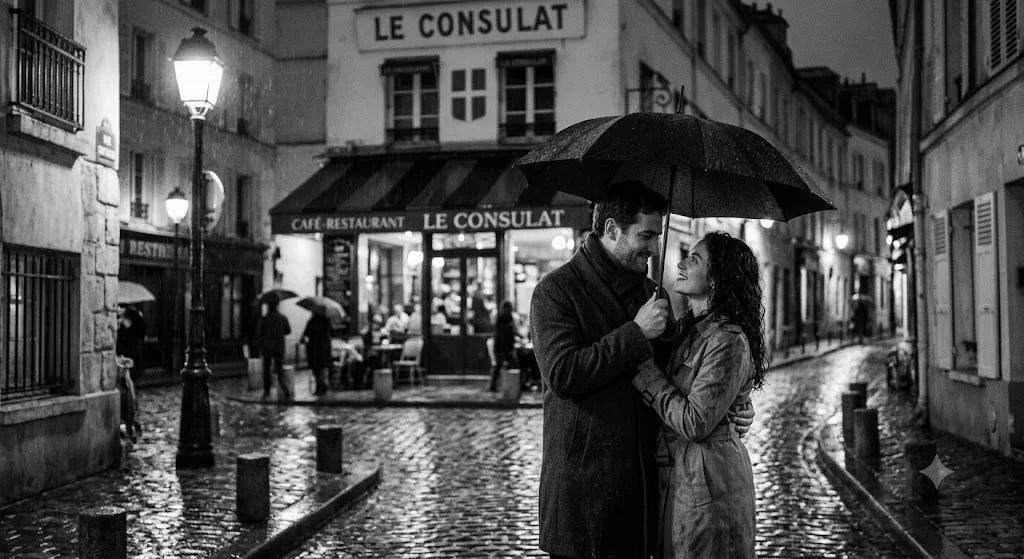
Transform this couple photo into a moody black-and-white Parisian street scene at night. The background should be a narrow cobblestone alley with glowing streetlamps, wet pavement reflecting soft light, and a classic French bistro awning behind them. Add light rain and cinematic film grain. The couple is holding a single large black umbrella, looking at each other with a gentle smile. Keep their original faces, facial expressions, hairstyles, body proportions, and clothing colors completely unchanged. Only the background, lighting, and weather should change. No face distortion.
Prompt 2: Golden Hour by the Seine
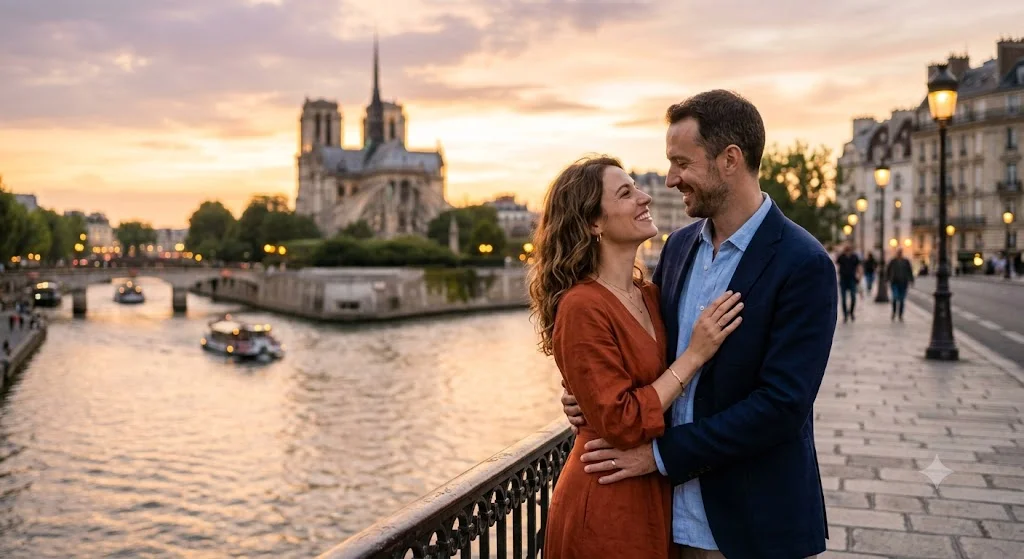
Edit this couple photo so they are standing on a stone bridge over the Seine River in Paris at golden hour. The sky should be soft peach and lavender, with the historic buildings of Île de la Cité visible in the distance. Warm, diffused sunlight should fall naturally on their faces, matching the original skin tones. Maintain their exact facial features, eye shape, smiles, hair texture, and body shapes without any alteration. The scene should look like a still from a tender romantic film, with a shallow depth of field and bokeh lights.
Prompt 3: Café Terrace at Twilight
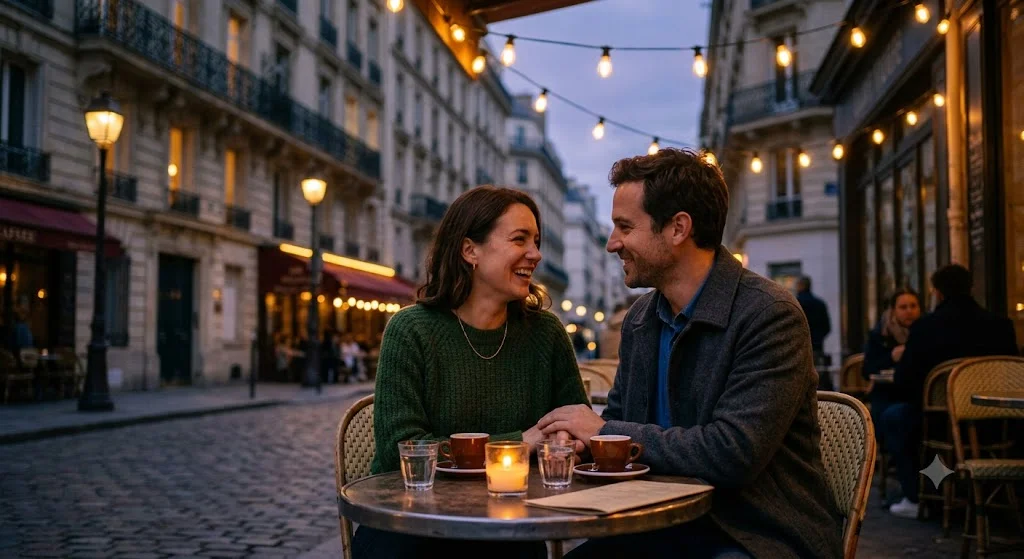
Reimagine this couple photo as a cozy scene at an outdoor Parisian café during twilight. They are sitting at a small round table with a single candle and two espresso cups. The background shows blurred café chairs, warm string lights overhead, and a narrow Haussmann-style street fading into dusk. Keep every detail of their faces, expressions, hairstyle, and clothing identical to the original photo. The overall atmosphere should feel intimate and cinematic, like a scene from the movie Amélie, but with their real faces perfectly preserved.
Prompt 4: Vintage Montmartre Stroll
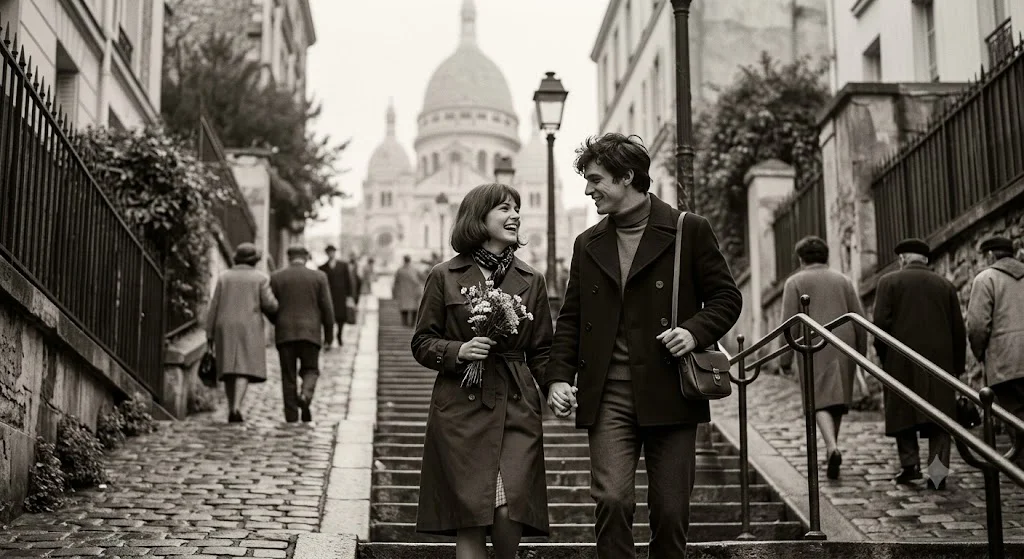
Turn this couple photo into a 1960s French New Wave film still. The couple is walking up the famous stairs of Montmartre, with the Sacré-Cœur Basilica softly out of focus in the background. Apply a subtle sepia tone and light film grain to mimic old celluloid. The woman’s dress and the man’s jacket should keep their original colors but gently desaturated to fit the vintage palette. Their actual faces, proportions, hair, and natural expressions must remain exactly as they appear in the original image. No changes to their identity, only the environment and film style.
Prompt 5: The Eiffel Tower Kiss
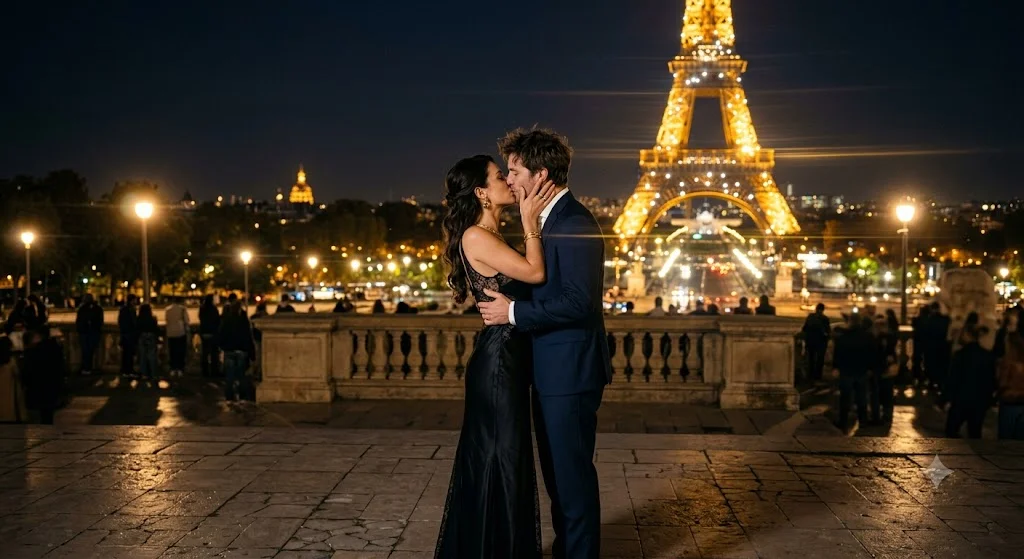
Transform this photo into a grand romantic moment with the Eiffel Tower sparkling at night in the background. The couple is standing on the Trocadéro esplanade, sharing a gentle kiss, bathed in the tower’s golden lights. Add a dreamy, soft-focus lens effect and a slight anamorphic flare to make it look like the climax of a romantic comedy. It is critical that their original faces, lip shape, nose, eyes, hair color, and body structure remain absolutely unchanged. Do not swap or alter their identities. Only the surroundings and lighting should be different.
I’ve used all five of these with photos taken in parking lots, living rooms, and one particularly unflattering dressing-room selfie, and each time Gemini produced something that made me want to frame it. The key in every prompt is that direct, unwavering command: keep their original faces exactly. Without that, the AI tends to default to generic “beautiful people” who might look related but aren’t really you.
WHAT I LEARNED THE HARD WAY (COMMON MISTAKES)
If you try this and your first result looks weird, you’re not alone. I made every mistake in the book, and fixing them made the difference between a laughable fail and a believable scene.
The biggest mistake was not using a clear reference photo. If your original image is dark, grainy, or has one person’s face partially turned away, Gemini will struggle to lock onto those features. Pick a photo with flat, even lighting and both faces fully visible. I once uploaded a silhouette from a sunset beach pic and wondered why the AI gave us Picasso-style faces. Don’t be me.
Another trap: short, lazy prompts. Typing “make background Paris” won’t cut it. You need to describe the scene like a film director. Mention the lighting style, the mood, the film stock, the time of day, the depth of field, and always repeat the identity instruction. The more cinematic detail you add, the better the AI matches that texture and atmosphere to your faces.
I also learned not to ignore skin tone matching. If you place yourself into a warm sunset scene but your original photo was taken under cool fluorescent light, Gemini might keep your face but with a slightly mismatched color temperature. The fix is simple: after the first generation, reply with something like “warm up our skin tones to match the golden hour glow, but do not change our facial features.” The tool will adjust without losing identity.
Finally, a weird but important thing: avoid oversized accessories or props in the original photo. If one of you is wearing giant sunglasses or a hat that shadows half the face, the AI can misinterpret the edges and blend them strangely. Stick to photos where foreheads, eyes, and jawlines are unobstructed. I lost a whole evening trying to resurrect my partner’s face from under a baseball cap shadow. Learn from my pain.
A FEW EXTRA TIPS FOR A FLAWLESS RESULT
Beyond the prompts themselves, a couple of small tweaks can make the final image look even more professional and believable. Before you upload to Gemini, consider cropping your photo into a vertical or cinematic aspect ratio like 3:4 or even 2.35:1 if your photo editor allows. This subconsciously primes the AI for a movie-still composition, and I’ve found it reduces the chance of weird stretched backgrounds.
If you’re planning to print the image later, start with the highest resolution original you have. Gemini will generate at a decent size, but feeding it a sharp, detailed photo means you’ll end up with more usable pixels. I printed one of our Café Terrace shots as a 5×7 gift, and it genuinely looks like a professional movie poster.
Don’t be afraid to experiment with language from classic French cinema. Words like “Nouvelle Vague color grading,” “soft anamorphic bokeh,” or “Kodak Portra 400 film stock” can push the AI into very specific aesthetic territories. I’ve found that naming a film style often gets better results than just saying “vintage.” You can even reference directors like “in the style of a Jean-Pierre Jeunet film” for that warm, slightly surreal Amélie look.
And if you ever get a result where the background is perfect but the faces have subtly shifted – a slightly narrower jaw, a different eyebrow arch – do not settle. Reply to Gemini with exactly what’s wrong: “Make my partner’s jawline identical to the original photo, same width and shape, but keep the Paris street background.” It’s surprisingly responsive, and you can usually nail it within two or three iterations.
WRAPPING UP WITHOUT A HOLLYWOOD BUDGET
I started this little project hoping for one romantic photo I could text to my partner and say, “Look, we’re in Paris.” What I ended up with was an entire collection: a rainy black-and-white moment, a golden bridge at sunset, a café date that never happened but feels real every time I see it. All of them feature our real faces, real smiles, real connection. That’s the part that still gets me. It’s not just AI art; it’s us, somewhere we’ve never been, in a scene that feels like a movie we’d actually watch.
You don’t need a fancy camera, design skills, or even a passport. You need one good photo, the Gemini app, and the courage to be a little bit specific about your cinematic dreams. I’ve handed you my exact prompts, the ones that consistently work, and all the dumb mistakes I made so you can skip straight to the magic. Give it a try with your next couple photo. Be patient, be precise, and don’t be surprised if you find yourself scrolling through the results with a big, goofy smile on your face. That’s the real happy ending – no Eiffel Tower required.