AI tools are changing everything right now. From editing photos to creating full videos, things that used to take hours can now be done in seconds.
Recently, I tried two trending tools — Google Gemini and PixVerse — and honestly, I was surprised by how powerful they are.
Let me walk you through my experience and how you can use them too 👇
📸 Google Gemini – Create a Realistic Selfie With a Celebrity
What is Google Gemini?
Google Gemini is an advanced AI tool by Google that can create content using text, images, and ideas. It works on something called multimodal AI, which basically means it understands different types of input — like text and images — at the same time.
From my experience, it feels like having a creative assistant. You just write what you want, and it generates it for you.
🤳 My Experience With the Celebrity Selfie Feature
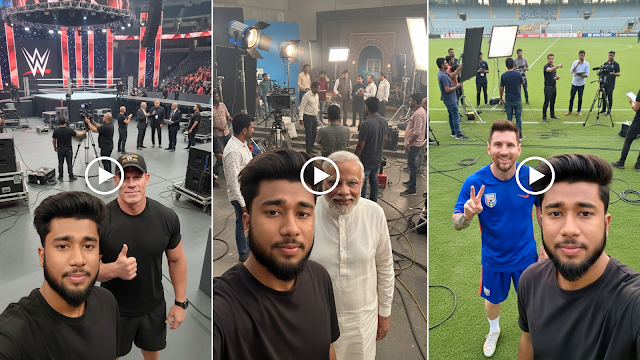
One feature that really impressed me was the ability to create realistic selfies with celebrities.
And the best part?
You don’t need any editing skills at all.
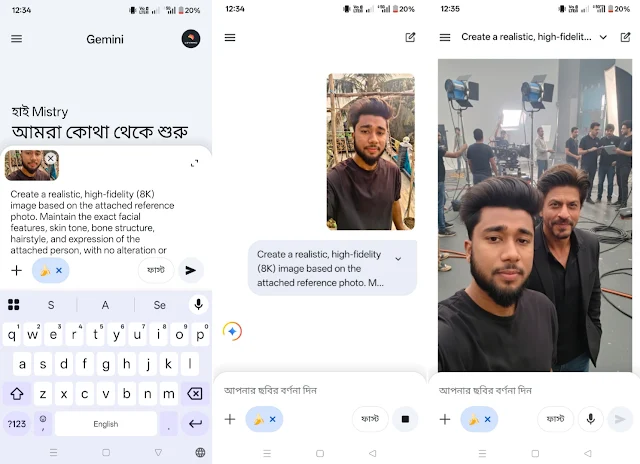
I simply typed a prompt like:
“Create a realistic selfie of me with Shah Rukh Khan.”
Within seconds, the AI generated an image that actually looked real. The lighting, facial expressions, and even the background felt natural — almost like I was actually standing next to him.
🔥 Why Google Gemini Stands Out
After trying a few AI tools, I noticed that Gemini is different because of its attention to detail:
- Realistic skin tones
- Proper lighting and shadows
- Natural camera angles
- Balanced background and expressions
Honestly, at first glance, you can’t even tell the image is AI-generated.
👥 Who Should Use This Feature?
This feature is perfect for:
- Social media content creators
- YouTubers and bloggers
- Designers and fan art creators
- Anyone who wants to try something fun
If you post these kinds of images on platforms like Instagram or Facebook, they have a high chance of going viral.
⚠️ A Quick Note (Important)
While this feature is fun, it’s important to use it responsibly.
Don’t use AI images to:
- Mislead people
- Create fake identities
- Spread false information
Use it for creativity and entertainment 👍
Prompt You Can Try
Here’s a refined version you can copy and use:
Create a realistic, high-fidelity (8K) image based on the attached reference photo. Maintain the exact facial features, skin tone, bone structure, hairstyle, and expression of the attached person, with no alteration or face swapping.
The attached person is taking a selfie with [Celebrity Name], standing at [Location Name] Crew members are adjusting internal lighting and equipment, with cables and gear visible. Directors and managers are standing behind, discussing the next take.
🎬 PixVerse – Turn Your Photos Into AI Videos
After experimenting with images, I tried something even more exciting — turning photos into videos using PixVerse.
And this is where things got really interesting.
What is PixVerse?
PixVerse is an AI-powered app that converts your photos into high-quality videos automatically.
No editing. No complicated tools. Just upload and let AI handle everything.
🎥 Features I Personally Liked
1. Photo-to-Video Magic
You can turn one or multiple images into a dynamic video. It actually feels like your photos come to life.
2. Smart AI Animation
The app analyzes facial expressions, depth, and background — then adds realistic movement.
3. High-Quality Output
You can export videos in HD or even 4K, which is perfect for social media.
4. Trendy Styles & Effects
There are ready-made templates, cinematic effects, and transitions that make your video look professional.
5. Beginner-Friendly Interface
Even if you’ve never edited a video before, you can still create something amazing in just a few taps.
🛠️ How I Used PixVerse (Step-by-Step)
Here’s exactly what I did:
- Installed the app
- Uploaded my photo
- Selected a video style
- Waited a few seconds
- Downloaded the final video
That’s it. No complicated steps.
👥 Who Should Use PixVerse?
- Content creators
- YouTubers & Reels makers
- Bloggers & digital marketers
- Anyone who wants quick, eye-catching videos
Prompt for PixVerse
Try something like this:
The person in the first picture will take a selfie with the celebrity, then the person will walk and take a selfie with the celebrity in the second photo. The person’s face will be happy with a smile.
🚀 Why I Recommend PixVerse
From my experience, PixVerse is perfect if you:
- Want to save time
- Don’t know video editing
- Need quick, professional-looking content
You can create viral-style videos directly from your phone — no laptop or software needed.
🏁 Final Thoughts
Both Google Gemini and PixVerse are powerful tools that show how far AI has come.
- Gemini is perfect for realistic AI images and selfies
- PixVerse is great for turning photos into engaging videos
If you’re into tech, content creation, or just want to try something fun, I highly recommend giving them a try.
Once you use them, you’ll understand how powerful AI has become 🔥