How to Turn Your Couple Photos Into a Magical Winter Wonderland Portrait Using AI

We never get snow where we live. I’m talking the kind of Christmas card snow — thick white blanket on the ground, frost on the windowpanes, pine trees sagging under the weight of it. Every December, my partner and I joke about how our holiday photos look exactly like every other month of the year. Sun, green grass, same backyard. Wonderful life, terrible winter aesthetic.
So last Christmas I decided to fix it. I spent an evening experimenting with Gemini AI, uploading our photos and trying to describe that perfect winter scene I had in my head. The first few attempts were rough — generic snowy backgrounds that looked pasted in and fake. But once I figured out how to write the prompts properly, something clicked. The result looked like we had actually flown to Vermont for a professional winter photo shoot.
We used it as our Christmas card that year. My mom called to ask which photographer we hired.
These four prompts are the ones that actually work. Each one captures a different kind of winter magic — from a cozy cabin Christmas to a dramatic snow-covered forest to a glittering holiday city street. No matter where you actually live, you can have the winter couple photo you’ve always wanted.
Why Winter Couple Photos Hit So Hard on Pinterest
Winter and holiday content is some of the highest-performing material on Pinterest year-round — not just in December. People save winter aesthetic images in July. They bookmark cozy cabin photos in March. There’s a timeless, emotional quality to the winter aesthetic that keeps it relevant regardless of the season.
For couples specifically, winter photography has a warmth-against-cold contrast that’s genuinely beautiful. Two people bundled up together, breath visible in the cold air, surrounded by snow or Christmas lights — it’s one of the most universally romantic visual setups that exists. And with AI, you can recreate it any time of year without a plane ticket or a photographer.
These images also make incredible Christmas cards, holiday gifts, and anniversary presents for the winter months. They’re practical and beautiful at the same time — which is exactly the kind of content people return to again and again.
What You Need to Get Started
Head to gemini.google.com and confirm you’re using Gemini 2.0 Flash or higher, which supports image generation. Upload one photo of yourself and one of your partner directly in the chat window before pasting your chosen prompt below.
For winter portraits, the best source photos are ones where you’re already wearing layers — a sweater, a jacket, a hoodie. It gives Gemini something natural to work from when it adds winter outerwear. That said, it works fine with summer clothing too — the AI will update the outfits as part of the styling process. Just make sure your faces are clear and well-lit.
One thing that helps with winter scenes specifically: upload photos with neutral or simple backgrounds if you can. A photo taken against a plain wall or outdoors with open sky behind you gives Gemini an easier canvas to replace with a winter setting. Busy or cluttered backgrounds can sometimes bleed into the generated scene in weird ways.
The 4 Prompts — Each One a Different Kind of Winter Magic
Prompt 1 — The Classic Christmas Card Portrait
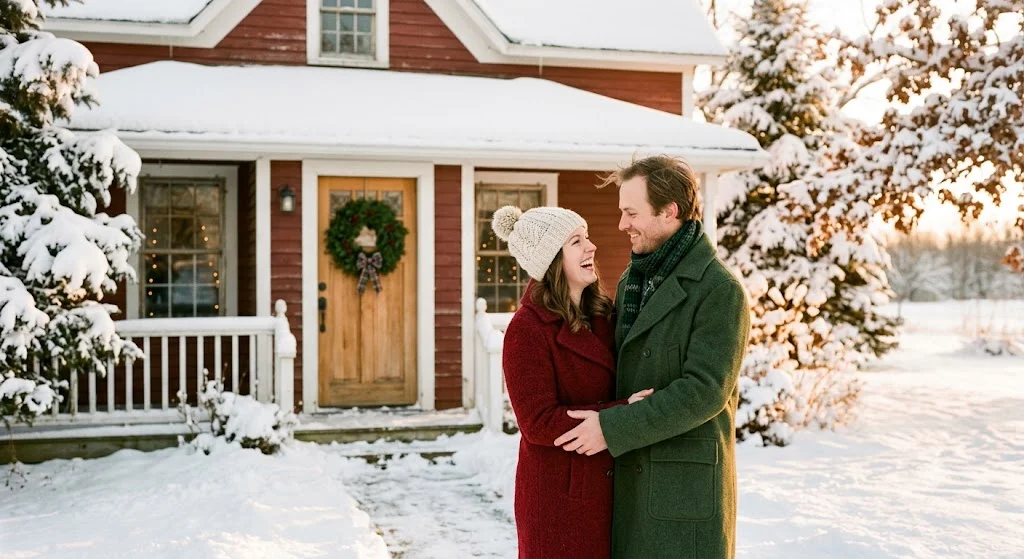
This is the one I used for our Christmas card and the one that made my mom ask about the photographer. It goes for that timeless, warm, deeply classic holiday portrait look — the kind of image that belongs on a card you actually keep rather than toss. Snowy outdoor setting, cozy winter outfits, soft warm light. Clean and beautiful.
Prompt:
I am uploading two photos — one of me and one of my partner. Please combine us into a single couple portrait styled as a classic Christmas card photograph. Place us in a beautiful outdoor winter setting — a snow-covered path through pine trees, a wooden fence with fresh snow, or the front of a charming farmhouse decorated for Christmas. Use soft, warm winter light — the kind of golden late-afternoon light that makes snow glow. We should be dressed in cozy, festive winter outfits — think wool coats, scarves, knit hats, warm gloves. The mood should be joyful and warm — smiling, close together, perhaps with one of us holding the other from behind or both looking at the camera with genuine happiness. Add a light snowfall effect — a few soft snowflakes drifting in the air. Preserve our real facial features from the uploaded photos. The final image should look like a professional Christmas card portrait taken by a lifestyle photographer.
Pro tip: After downloading the result, take it into Canva and add a simple text overlay like “Merry Christmas from the [your name] Family” in a clean script font. It takes two minutes and transforms the image into a print-ready holiday card.
Prompt 2 — The Cozy Cabin Christmas Scene
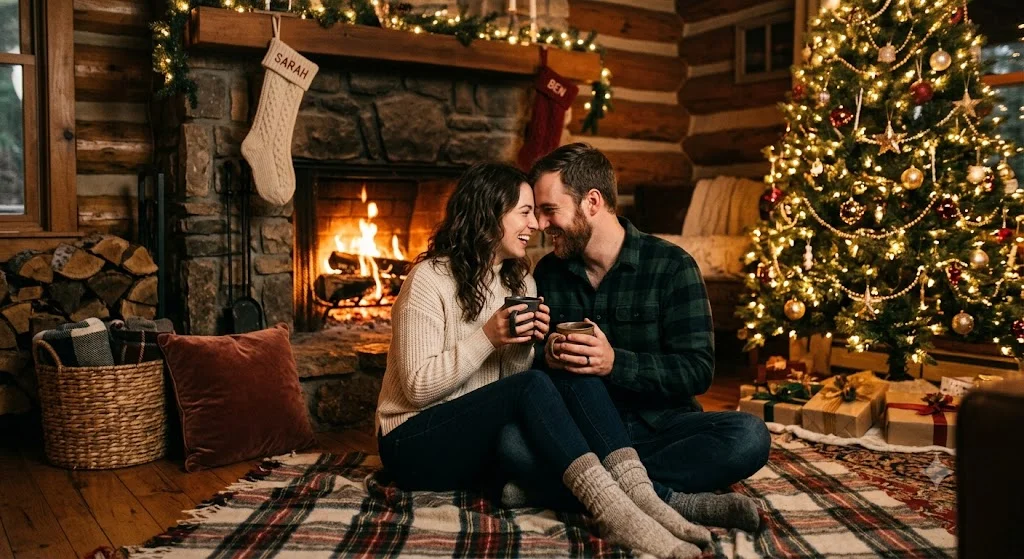
Some of the most beautiful winter couple photos aren’t taken outside in the cold — they’re taken inside, next to a fireplace, with Christmas lights glowing and mugs of something warm in hand. This prompt recreates that interior holiday magic. It’s the kind of image that makes people feel warm just looking at it — and on Pinterest, that feeling translates directly into saves.
Prompt:
I am uploading two photos — one of me and one of my partner. Please combine us into a single couple portrait in a cozy Christmas cabin interior setting. The background should show a beautifully decorated space — a crackling fireplace, a fully decorated Christmas tree with warm glowing lights, soft blankets, and rustic wooden cabin details. The lighting should be entirely warm and intimate — firelight and Christmas light glow, no harsh overhead light. We should be dressed in cozy holiday loungewear — flannel, chunky knit sweaters, warm socks. We can be sitting together on a couch or floor near the fireplace, holding mugs, or sharing a quiet comfortable moment. The mood should feel deeply warm, intimate, and festive — like a perfect Christmas Eve at home. Preserve our real facial features from the uploaded photos. The final image should feel like a lifestyle photo shoot set inside a stunning holiday cabin.
Pro tip: This prompt produces the warmest color palette of the four — deep ambers, rich reds, golden light. It looks stunning printed large and framed. If you want to give a partner or family member a holiday gift that genuinely surprises them, print this one at 11×14 on matte paper and frame it.
Prompt 3 — The Dramatic Snow Forest Portrait
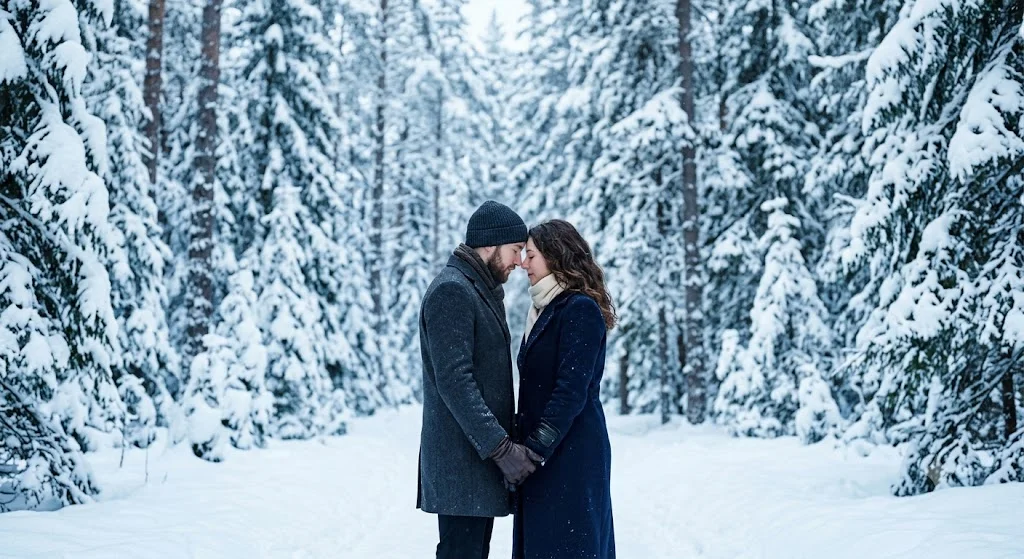
This one goes in a completely different direction from the warm and cozy prompts. It’s cinematic, quiet, and a little breathtaking. Think of those editorial winter photography shoots where a couple stands in a completely still, snow-covered forest and the world looks like it stopped just for them. It has a fairy tale quality without looking fake or fantasy-like — it looks like a real place that just happens to be impossibly beautiful.
Prompt:
I am uploading two photos — one of me and one of my partner. Please combine us into a single couple portrait set in a dramatic winter forest. The setting should show tall snow-covered trees surrounding the couple — a dense, quiet, magical forest blanketed entirely in white. Use cool, cinematic lighting — soft diffused winter daylight filtering through the trees, creating a blue-white atmosphere with breath visible in the cold air. The mood should feel serene, cinematic, and deeply romantic — like a moment completely alone in a silent winter world. We should be dressed in elegant winter outerwear — long coats, scarves, leather gloves. The pose can be intimate — forehead to forehead, one partner holding the other close, or both walking together through the snow. Preserve our real facial features from the uploaded photos. The final image should feel like a cinematic editorial photograph taken deep in a winter forest in the Pacific Northwest or Scandinavia.
Pro tip: The cool blue-white tones of this prompt make it stand out sharply on Pinterest against the warmer content that dominates the platform. It catches attention precisely because it feels different. Use this one as a Pinterest pin thumbnail if you want to stop scrollers in their tracks.
Prompt 4 — The Holiday City Lights Night Scene
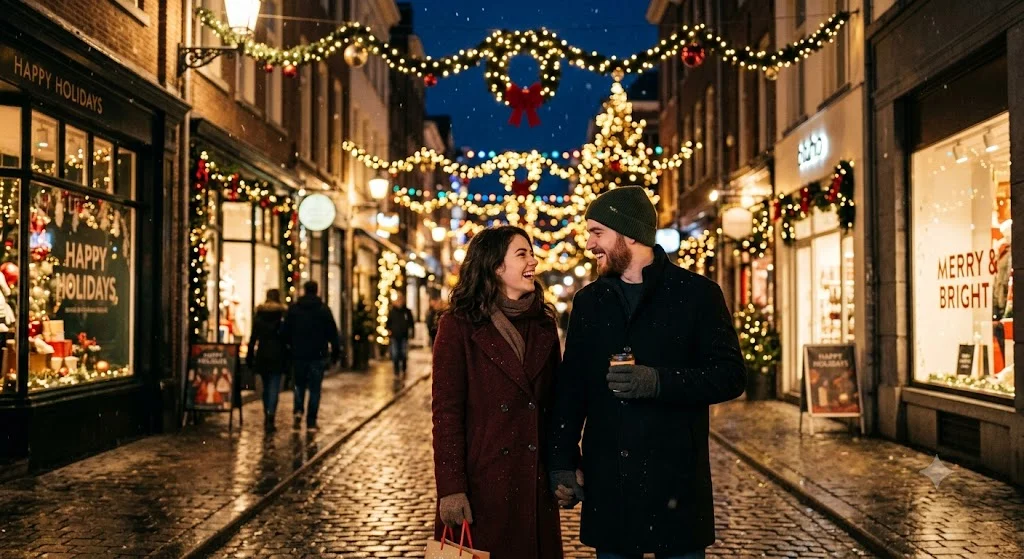
Not everyone’s ideal winter scene is a quiet forest or a farmhouse. Some people’s perfect winter memory is walking through a city with Christmas lights everywhere — storefronts glowing, decorations overhead, that electric energy of a big city fully lit up for the holidays. New York at Christmas. Chicago’s Magnificent Mile. The lights on the Magnificent Mile in December. This prompt captures exactly that feeling.
Prompt:
I am uploading two photos — one of me and one of my partner. Please combine us into a single couple portrait set on a beautiful city street decorated for Christmas at night. The background should show a magical urban holiday scene — string lights and Christmas decorations overhead, warm glowing storefronts, light snow falling, and the soft bokeh blur of holiday lights stretching down the street behind us. The overall color palette should be warm gold and red from the Christmas lights against the cool dark blue of the night sky. We should be dressed in stylish winter outerwear — coats, scarves, boots. The mood should feel romantic and festive — two people completely at home in the magic of a city at Christmastime. We can be walking together, laughing, or pausing to share a quiet moment while the city glows around us. Preserve our real facial features from the uploaded photos. The final image should feel like a cinematic lifestyle photo shoot on a New York or Chicago street at Christmas.
Pro tip: This prompt produces the most visually striking result of the four because of the contrast between the night sky and the warm holiday lights. It works beautifully as a phone wallpaper and performs extremely well on Pinterest because the bokeh light effect in the background is impossible to scroll past.
Mistakes That Will Make Your Winter Photos Look Fake
The single biggest issue with AI winter scenes is when the snow looks obviously pasted in rather than integrated into the scene. This almost always happens when the source photo has very warm, summery lighting — bright sunshine, deep tan skin tones, vivid green backgrounds. The AI struggles to reconcile the warm source image with a cold winter environment.
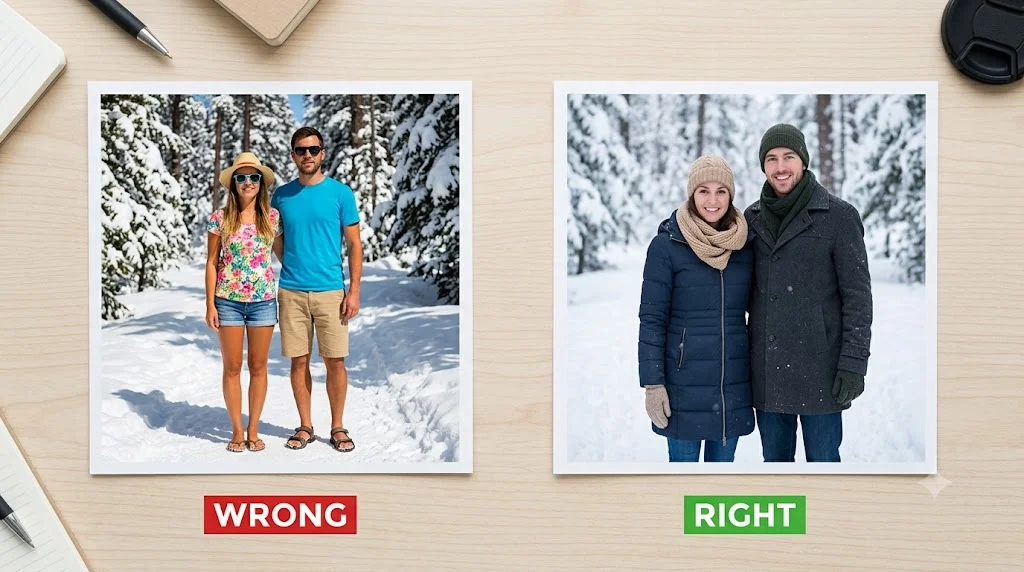
If your source photos were taken in summer or bright sunlight, add this line to any of the prompts above: “Adjust the overall color temperature of the subjects to feel cooler and more consistent with a winter environment.” That one instruction makes a significant difference.
The second issue is clothing mismatch. If you’re wearing a t-shirt in your source photo and the AI doesn’t fully update your outfit, it looks jarring against a snowy background. Most of the prompts above include explicit clothing instructions to prevent this — but if you still see a mismatch in the result, follow up with: “Make sure both people are fully dressed in appropriate winter outerwear — coats, scarves, and warm accessories throughout.”
And as always — if the first result isn’t quite right, iterate. Winter scenes respond particularly well to follow-up lighting instructions. “Make the snow glow warmer” or “add more falling snowflakes in the foreground” are both instructions that Gemini handles really well in a follow-up message.
How People Are Using These Images
The most popular use is obviously Christmas cards. Services like Shutterfly, Minted, and Canva all let you upload your own photo to a card template and order printed cards. A professional-looking winter couple portrait as your holiday card is something people genuinely remember — and with this method, it costs you nothing but a few minutes of prompting.
Beyond cards, these are also being used as holiday phone wallpapers, framed gifts for parents and grandparents, and social media holiday posts. The cozy cabin version in particular tends to go semi-viral when people share it — the warmth of the image triggers an emotional response that makes people want to save and share it.
And if you don’t celebrate Christmas, these winter aesthetics work just as well for New Year’s Day, Valentine’s Day, or just a beautiful seasonal couple portrait with no occasion attached. The snow and the coziness are the draw, not the holiday.
You Don’t Need Snow to Have a Winter Photo
That’s really the point of all of this. The most beautiful winter couple photos don’t require you to live somewhere cold, spend money on a photographer, wait for the right weather, or drive anywhere. They require about ten minutes, two decent photos, and the right prompt.
My mom still has the Christmas card version we sent her last year on the refrigerator. She knows we made it with AI now — I told her eventually — and she keeps it up anyway. She said it doesn’t matter how it was made. It looks like us, it looks beautiful, and it makes her happy every time she sees it.
That’s the whole point. Try one of these prompts tonight and see what you get. Drop the result in the comments — I’d genuinely love to see your winter moment.