3D Photo Cube Live Wallpaper – Turn Your Photos into Attractive 3D Cube Wallpapers
Introduction:
We spend half our lives staring at our smartphones these days, right? They aren’t just tools we use to call people or send quick text messages anymore. Honestly, my phone feels like an extension of who I am. It is a digital canvas where I express my personal style and vibe. Like most of you, I get incredibly bored looking at the exact same screen day in and day out. I always want my device to stand out in a crowd, to feel a little unique, and to actually represent me.
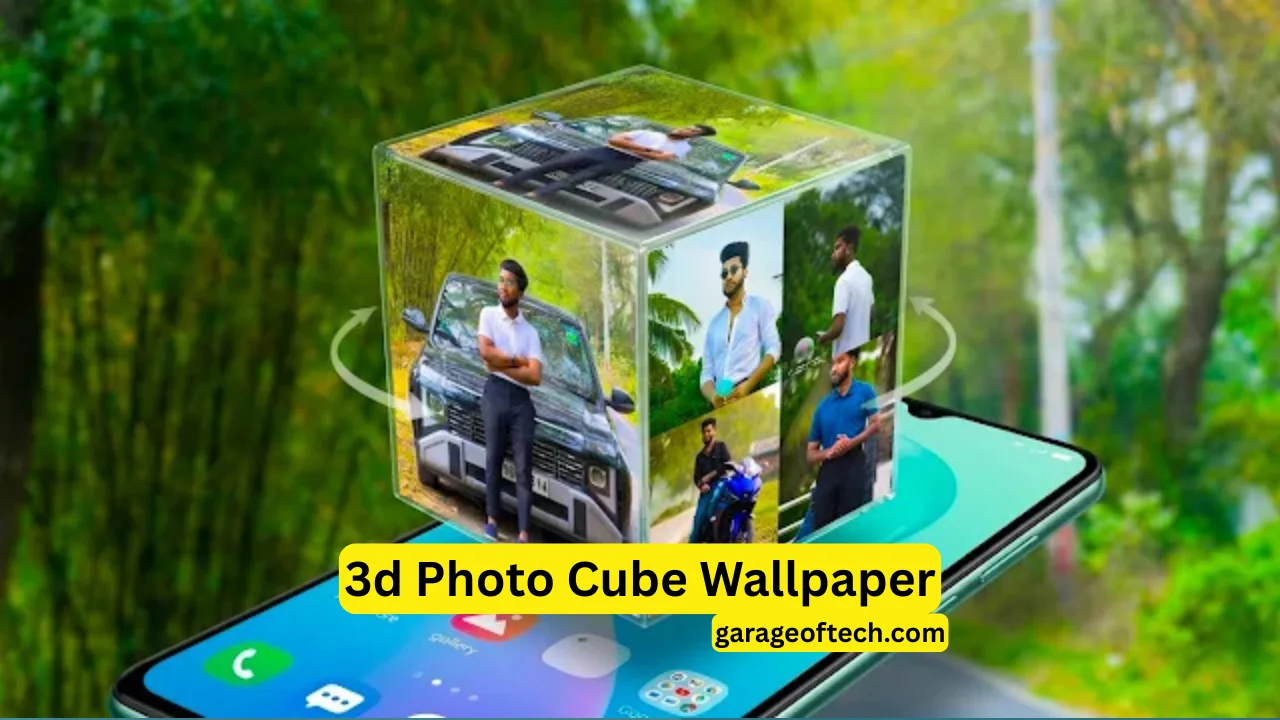
Recently, I went down a rabbit hole trying to find a way to make my home screen pop. That is exactly when I stumbled upon this absolute gem of an application called “3D Photo Live Wallpaper.” Let me tell you, if you want to completely transform the vibe of your phone, you need to check this out. By using your very own photos, this app lets you build a mesmerizing, spinning 3D cube right on your home screen.
In this detailed review, I am going to walk you through my personal experience with the app. I will break down all the cool features, explain exactly how I set it up, weigh the pros and cons honestly, and tell you why I think it deserves a permanent spot on your device.
What Exactly is 3D Photo Live Wallpaper?
If I had to describe it simply, 3D Photo Live Wallpaper is a brilliant Android application that takes the standard, boring images from your phone’s gallery and turns them into a dynamic, rotating 3D cube. You then set this cube as the live wallpaper on your home screen.
Picture this: every single time you unlock your phone, instead of staring at a flat, motionless picture, you are greeted by a smooth, rotating cube. And the best part? Every single side of that cube showcases a different photo that you personally handpicked. I spent ages just watching it spin the first time I set it up because it is genuinely fascinating to look at. It goes way beyond just being a simple background image. It actually takes your favorite memories, your friends, your family, or your pets, and transforms them into a living, breathing interactive experience right in the palm of your hand.
The Main Features That Hooked Me
When I first downloaded the app, I expected a barebones tool, but I was pleasantly surprised by what it packed inside. Here is a breakdown of the main features that really stood out to me:
1. The Mesmerizing 3D Cube Effect: Without a doubt, the absolute coolest aspect of this entire application is the 3D cube animation itself. The developers nailed the physics and the visual appeal. The way your chosen photos wrap around each individual face of the cube as it continuously spins is incredibly satisfying. It gives your screen a depth that standard wallpapers simply cannot match.
2. Total Freedom with Custom Images: I love having control over how things look. This app gives you the complete freedom to dive into your camera roll and select any image you want. You can pick six entirely different photos—one for each side of the 3D shape. I used pictures from a recent road trip, and it felt like I had a spinning digital photo frame right on my home screen.
3. Adding Custom Text and Names: Sometimes pictures aren’t quite enough. I discovered that you can actually type out your name, an inspiring quote, or any specific word you love, and the app will plaster it right onto the cube. It adds an extra layer of personalization. I threw my nickname on there just to see how it looked, and it made the whole setup feel incredibly custom-made for me.
4. Smooth Auto-Rotation: You do not have to swipe the screen constantly to make the cube move. The app features an automatic rotation setting that keeps the cube spinning smoothly on its own. This constant, gentle motion makes your phone interface look incredibly dynamic and full of life, even when it is just sitting on your desk.
5. Surprisingly Battery Friendly: I will be completely honest with you; I usually avoid live wallpapers like the plague because they completely drain my phone’s battery before lunchtime. I was heavily skeptical about this app for that exact reason. However, to my absolute surprise, it is highly optimized. I ran it all day, and I hardly noticed any extra battery drain compared to my standard static wallpaper.
6. A Wonderfully Simple User Interface: I am not a fan of complicated software that requires a manual to figure out. Thankfully, the user interface here is remarkably straightforward. Everything is clearly labeled, and the menus make sense. Even if you consider yourself a complete beginner with technology, you will have absolutely zero trouble navigating through the options and getting everything set up perfectly.
How Do You Actually Use It?
Setting this whole thing up took me maybe three minutes max. It is incredibly intuitive. Here is the step-by-step process I went through, so you know exactly what to expect:
- Step 1: Install the application. First things first, grab your phone, open up the Google Play Store, type “3D Photo Live Wallpaper” into the search bar, and hit that download button. It installs pretty quickly since it is not a massive file.
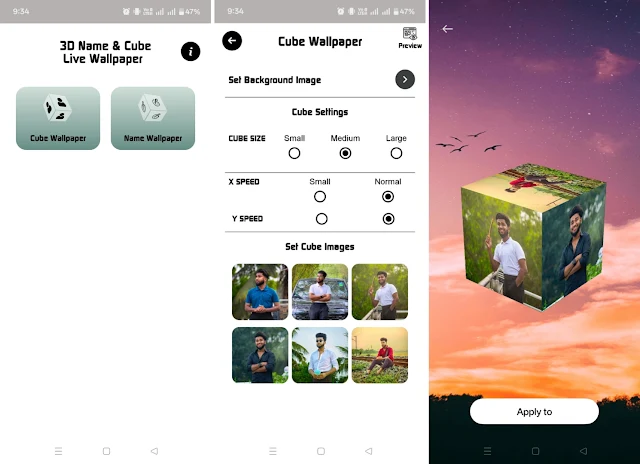
- Step 2: Launch the app. Tap the icon to open it up. Right away, you are greeted with a very clean dashboard showing you the various settings and customization options available to you.
- Step 3: Pick your favorite images. Tap on the image selection option. This opens up your phone’s gallery. Take your time here! I scrolled through hundreds of photos before picking the perfect six. You assign a different image to the top, bottom, left, right, front, and back sides of the cube.
- Step 4: Tweak the customizations. This is where I had the most fun. I played around with the rotation speed—I prefer a slightly slower, relaxing spin rather than a fast, dizzying one. You can also change the background color behind the cube and add in your custom text during this step.
- Step 5: Set it as your Live Wallpaper. Once I was happy with how everything looked in the preview, I simply tapped the big “Set as Wallpaper” button. The app asked if I wanted it on just my home screen or both my home and lock screens. I chose the home screen, and boom—it was done!
Why Should You Even Bother Using This App?
You might be wondering why you should go through the effort. Well, from my own personal experience, here are the biggest reasons why I think it is totally worth it:
1. Ultimate Personalization: We all want our stuff to feel like ours. By crafting a live wallpaper out of your own cherished memories, your phone instantly becomes a highly personal device that no one else in the world can replicate.
2. An Eye-Catching, Unique Design: The very first day I used this, three different coworkers asked me how I made my screen look like that. The 3D animation immediately grabs people’s attention. It makes your smartphone stand out in a sea of boring, default backgrounds.
3. It is Amazing for Social Media Content: If you are into sharing cool stuff online, this is a goldmine. I actually recorded a quick screen capture of my spinning custom cube and tossed it up on my Instagram story. People loved it! It is highly shareable content for platforms like Facebook, Instagram, or even YouTube shorts.
4. It is Fast and Painless: I appreciate apps that respect my time. There are absolutely no convoluted menus or confusing jargon. You literally just tap a few buttons, pick your pictures, and you instantly have a stunning result.
My Personal Pro Tips for the Best Results
After messing around with the application for a few days, I figured out a few tricks to make the cube look significantly better. Keep these in mind:
- Always use high-resolution images. I tried a low-quality, pixelated meme for one side, and it looked terrible when stretched across the 3D surface. Stick to crisp, clear photos.
- Mix up the pictures. Do not use the same photo for every side. Put a completely different image on each face of the cube to make the rotation much more interesting to watch.
- Pay attention to contrast. Make sure the colors in your photos stand out nicely against whatever background color you choose for the app. Good color balance makes a massive difference.
- Use it for branding! If you run a YouTube channel or a blog, drop your logo or brand name onto the cube. It looks incredibly professional if you are ever doing a screen recording for a tutorial.
The Good and The Bad (Honest Pros and Cons)
No application is entirely perfect, so I want to be completely straight with you about the advantages and the drawbacks I experienced.
The Advantages:
- It is ridiculously easy to figure out and use.
- The 3D animation is incredibly smooth and visually striking.
- It offers plenty of room to customize things exactly how you like them.
- It sips battery power rather than gulping it down, which is a massive plus.
The Disadvantages:
- If you are rocking a much older or budget-friendly smartphone, you might notice a little bit of lag or stuttering during the animation.
- I used the free version, which does mean you have to deal with a few annoying advertisements popping up while you are inside the settings menu.
- It does exactly what it promises, but if you are looking for highly complex, advanced animation tools, you will not find them here. It is fairly basic in its scope.
Who Will Actually Love This App?
Based on my time with it, I firmly believe this application is absolutely perfect for a specific group of people:
- Anyone who is tired of the default look and desperately wants to make their phone feel one hundred percent unique.
- Social media creators who need cool visual elements to show off to their followers.
- Sentimental folks who want a dynamic, living showcase of their favorite pictures right on their home screen.
- Vloggers, YouTubers, and bloggers who want to add a subtle bit of branding to their device screens during their videos.
My Final Thoughts
At the end of the day, the 3D Photo Live Wallpaper application is a fantastic little tool that effortlessly breathed new life into my smartphone. It is so much more than just another background app; it feels like a genuine reflection of my personality. Being able to showcase my favorite moments, my silly nicknames, and my best photos through a continuously rotating, interactive 3D cube has been a genuinely extraordinary experience for me.
If you are sitting there wanting to make your phone drastically more attractive, fun, and totally unique to you, I highly recommend that you give this application a try. If you are someone who loves tweaking and customizing your digital space, I can almost guarantee this will be the perfect addition to your app library. It is straightforward, it is visually beautiful, and it is entirely unique. 3D Photo Live Wallpaper is a phenomenal choice, and I am definitely keeping it running on my phone for the foreseeable future.